

If you're running ads, building a shop page, or linking to your storefront from Facebook, you need to know exactly how Meta allows you to use its name, logo, and assets. Facebook brand guidelines exist to protect the platform's identity, and violating them can get your content flagged, your ads rejected, or your page penalized. That's not a hypothetical. It happens to sellers and small businesses every week.
For print-on-demand sellers especially, brand presentation matters at every touchpoint. You spend time getting your product mockups right, matching the case finish, the camera cutout, the edge profile, so that what a customer sees is what they actually receive. At Bettermockups, that's our entire reason for existing: production-accurate mockups that eliminate the gap between listing and delivery. But that same attention to accuracy should extend to how you represent other brands in your marketing, Facebook included.
This guide covers everything you need: the official rules for using Facebook's name and logo, where to download approved assets, the design standards Meta enforces, and the mistakes that get businesses into trouble. Whether you're designing ad creatives, building a landing page, or adding social icons to your Shopify store, you'll walk away knowing exactly what's allowed and what isn't, straight from Meta's own documentation, updated for 2026.
What Facebook brand guidelines cover
Meta publishes its brand rules through the Meta Brand Resource Center, which is the official source for everything related to using Facebook's name, logo, and visual identity. The Facebook brand guidelines lay out four main categories of rules: logo usage, trademark language, advertising standards, and third-party integration requirements. If you've ever wondered whether you can put a Facebook logo on your website footer or reference "Facebook" in ad copy, this is where those answers live.
The logo and visual identity rules
The guidelines specify exactly how the Facebook logo can appear in your materials. Size, color, spacing, and context are all controlled. You can download approved logo files directly from the Meta Brand Resource Center, and those files are the only versions you should use. Meta prohibits modifying the logo in any way, which means no color changes, no stretching, no added effects like shadows or gradients, and no placing the logo inside a container shape that falls outside the approved design system.
Using an unofficial or edited version of the Facebook logo in your ads or storefront is one of the fastest ways to get a creative flagged or rejected.
Trademark and naming standards
Facebook is a registered trademark, and Meta's guidelines govern how you write it in text. The word "Facebook" should always appear with a capital F, it should never be abbreviated, and it cannot be used in a way that suggests Meta endorses your product or business. For example, you can say your store "has a Facebook page," but you cannot say your product is "Facebook-approved" or "Facebook-certified." These distinctions matter because Meta actively monitors third-party use of its brand assets.
Third-party and integration rules
Connecting Facebook to your website, app, or storefront triggers a separate set of requirements. Login buttons, social share icons, and API integrations all have specific visual standards that differ from general logo usage. Meta requires that the Facebook login button uses the approved text and button style with no alterations. Your social share icons need to follow the approved color and sizing specifications as well. These rules exist to keep the experience consistent for users across every platform that connects to Facebook's ecosystem, and Meta treats deviations here just as seriously as it treats unauthorized logo edits.

Why Facebook brand rules matter
The Facebook brand guidelines aren't suggestions Meta posted online and stopped monitoring. They carry real legal weight, and Meta enforces them through both automated systems and manual review processes. Businesses that misuse Facebook's name or logo face ad rejections, account restrictions, and in serious cases, formal legal notices. For a seller running a live Etsy or Shopify store, any of those outcomes can disrupt revenue fast.
The business risk of getting it wrong
When you publish an ad creative or landing page that misuses the Facebook logo, Meta's automated systems can flag it before it reaches a single customer. Ad rejections waste your budget and reset the algorithm's learning phase, which costs real time and money even after you correct the problem. Repeated violations tied to a Facebook Shop or business page can trigger manual reviews that freeze your selling activity entirely, sometimes for days with no clear resolution timeline.
A single ad rejection tied to a brand guideline violation can stall a time-sensitive campaign at the worst possible moment, especially around a new product launch.
The trust angle
Your customers notice inconsistency faster than any platform algorithm. Using an unofficial or modified Facebook logo signals to shoppers that your brand operates carelessly, and that impression extends to your products, your fulfillment, and your overall credibility as a seller.
Following the brand rules correctly also tells Meta's systems that you're running a legitimate operation, which affects how your ads, page, and shop perform over time. The rules protect your business reputation as much as they protect Meta's trademark.
How to use the Facebook logo correctly
The facebook brand guidelines give you clear, specific rules for logo usage, and following them correctly is non-negotiable if you want your ads and listings to stay live. Every detail matters here: the file you use, the colors you apply, the spacing around the mark, and the background it sits on. Getting any one of these wrong is enough to trigger a rejection.
Download only from the official source
Meta requires that you pull your logo files directly from the Meta Brand Resource Center. Do not source the Facebook logo from image searches, third-party icon libraries, or stock sites. Those versions are often outdated, slightly modified, or in the wrong file format. The official files are the only ones Meta considers compliant, and using anything else puts your ads and integrations at risk.
Spacing, size, and color rules
Once you have the correct file, you need to apply it correctly. The logo must always have clear space around it, meaning no other graphic elements, text, or design details should crowd the mark. Meta defines the minimum clear space requirement in the brand documentation itself. For color, you can use the Facebook blue version or the all-white version, but you cannot recolor the logo to match your brand palette, add drop shadows, or apply any gradient effects.
Never stretch, rotate, or alter the logo's proportions, even slightly, because Meta's review systems flag these changes and your creative will not run.
Naming, copy, and trademark do's and don'ts
The facebook brand guidelines set specific rules for how you write the word "Facebook" in any text, not just how you display the logo. Trademark violations in copy are just as enforceable as visual misuse, and the distinction between acceptable and unacceptable language is narrower than most sellers expect. Getting this right matters whether you're writing a product description, an ad headline, or a social icon label on your storefront.
How to write "Facebook" in your copy
Facebook always starts with a capital F, with no exceptions. You cannot abbreviate it, stylize it in lowercase, or combine it with other words to create a new compound term. When you reference Facebook in your marketing copy, use it as a proper noun, not as a verb or generic descriptor. Writing "Facebook your friends" or "get Facebooked" violates Meta's trademark rules directly, and these mistakes appear in live ads more often than sellers realize.
Always treat "Facebook" as a brand name the same way you would treat any other registered trademark in your copy.
What you cannot say or imply
The most common mistake sellers make is implying a partnership or endorsement that does not exist. You can tell customers that your store has a Facebook page or that you run Facebook ads, but you cannot write phrases like "Facebook-approved," "as seen on Facebook," or "Facebook partner" unless Meta has explicitly granted you that status. Using language that suggests official affiliation puts your account and your ads at direct risk of suspension and enforcement action. Meta reviews third-party content actively, and phrases that blur the line between your business and the platform trigger enforcement faster than most other violations.
Facebook in ads, apps, and login screens
The facebook brand guidelines apply in full force any time you create an ad, build an app, or add a login button that connects to Facebook. Meta treats each of these use cases separately, with its own set of technical and visual requirements. Knowing which rules apply in which context keeps your campaigns running and your integrations compliant.
Running ads that reference Facebook
When you run ads on Meta's platforms, you cannot use the Facebook logo inside your creative to imply that Meta is endorsing your product or promotion. The logo can appear in limited contexts, such as directing users to your Facebook page, but only using the approved file and placement standards covered in the brand documentation. Your ad copy also falls under these rules. Phrases that suggest your product is affiliated with, sponsored by, or validated by Facebook will trigger a rejection from Meta's review system.
Keep your ad copy focused on your product and use Facebook's name only to describe where customers can find you, not to suggest any special relationship with the platform.
Apps and login button requirements
If you connect Facebook login to your Shopify store or any other app, Meta requires that you use the exact approved button design, including the specific text, icon, and color specified in the developer documentation. You cannot restyle the button to match your brand theme or swap the icon for a generic social logo. Deviating from the approved login button spec violates Meta's platform policies and can result in your app's API access being suspended without advance notice.
Final checklist before you publish
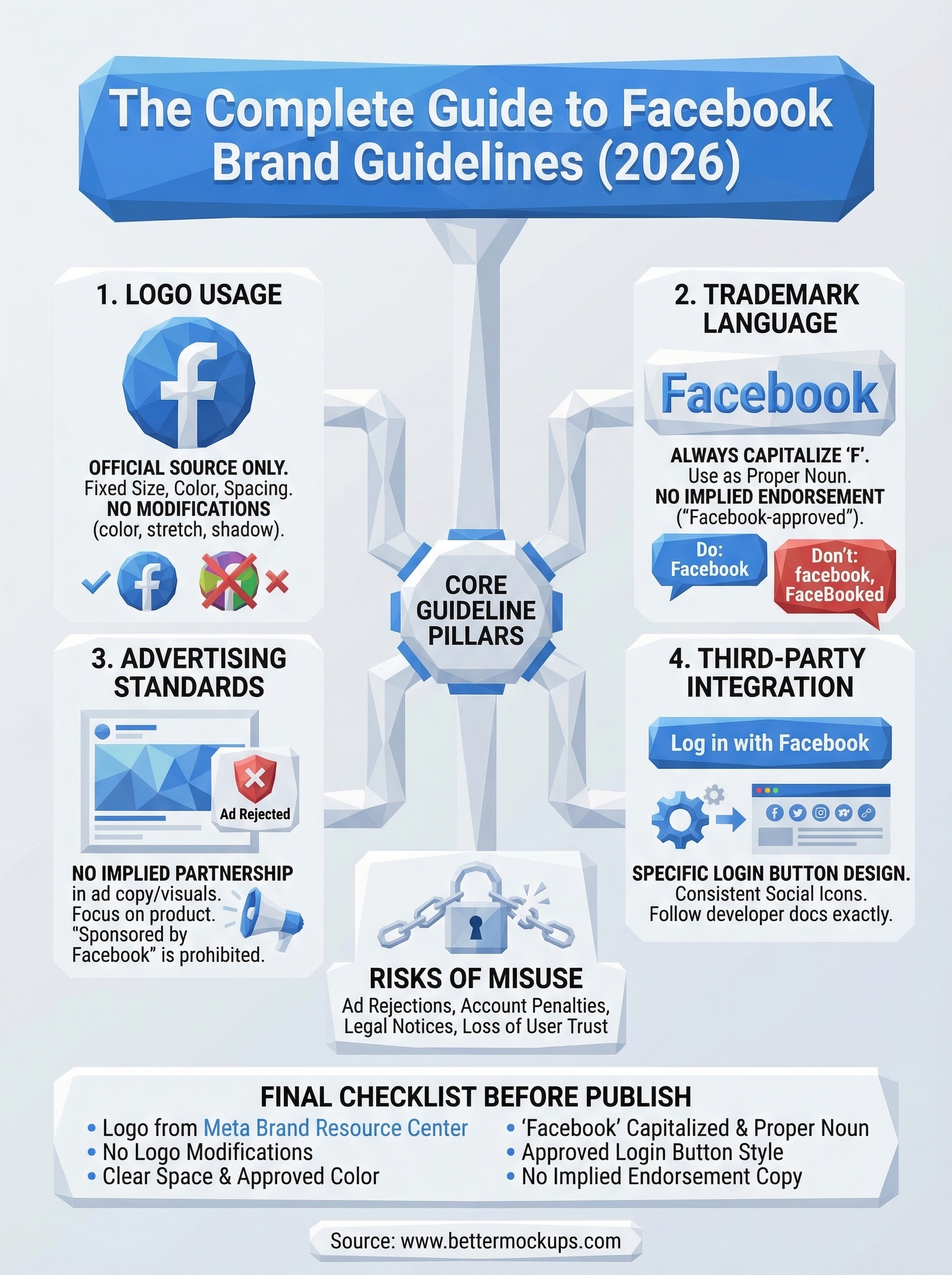
Before you push any ad creative, landing page, or storefront update live, run through these quick checks against the facebook brand guidelines to confirm you're compliant:
- Logo source: Downloaded directly from the Meta Brand Resource Center, not a third-party site
- Logo appearance: No color changes, shadows, stretching, or modifications of any kind
- Clear space: No text or design elements crowding the logo
- Copy: "Facebook" capitalized, used as a proper noun, no implied endorsement or partnership
- Login buttons: Approved design and text used exactly as specified in Meta's developer documentation
- Ad copy: No phrases suggesting Meta sponsors or validates your product
Getting these details right protects your ads from rejection and your account from enforcement action. Your listings deserve that same level of accuracy across every element, from the product image to the marketing copy surrounding it. If you want your product photos to match that same standard of precision, explore production-accurate phone case mockups at Bettermockups.


