

Choosing the best motion graphics software comes down to what you're actually building, and where you plan to use it. Whether you're creating animated product showcases for TikTok Shop, putting together social ads with moving elements, or producing full 3D renders for a client, the right tool depends on your skill level, your budget, and the type of motion work you do most often. Not every tool fits every workflow, and paying for features you'll never touch is a fast way to burn cash.
At Bettermockups, we build production-accurate video mockup templates for print-on-demand sellers, the kind of motion assets that turn static phone case listings into scroll-stopping content. We've spent real time inside these tools, testing how they handle everything from animated product reveals to looping social clips. That hands-on use is what shaped this list. We're not ranking software based on spec sheets; we're ranking it based on what actually works when you need to produce motion content that sells.
Below, you'll find 11 motion graphics tools compared across 2D and 3D workflows, with honest notes on where each one shines and where it falls short. Whether you're a beginner looking for something intuitive or a seasoned motion designer ready to push into 3D, this guide covers pricing, learning curve, and real use cases so you can pick the right software without the trial-and-error tax.
1. After Effects
After Effects sits at the center of almost every professional motion graphics conversation, and that position is earned. It handles 2D animation, compositing, visual effects, and text animation better than any other single tool on this list. If you're serious about motion work and want one piece of software that covers the most ground, After Effects is where most people land.
What it's best for
After Effects is built for layer-based 2D motion graphics and compositing workflows. It excels at title sequences, animated infographics, social video content, and product animations. If you're producing looping clips for TikTok ads or animated product mockups for an e-commerce listing, this is the tool most professionals reach for first.
Standout features for motion work
The graph editor and keyframe interpolation controls give you precise control over how animations ease in and out, which makes the difference between motion that feels mechanical and motion that reads as intentional. Motion paths, puppet tools, shape layer animation, and the expressions system (JavaScript-based logic that drives parameters automatically) all combine to make After Effects genuinely deep. The expressions system alone can save hours of manual keyframing once you learn to use it.
After Effects integrates natively with Premiere Pro, Illustrator, and Photoshop, which means your assets move between tools without conversion friction.
Limitations and gotchas
After Effects is not a 3D modeling or rendering tool. Its 3D capabilities are limited to moving 2D layers through 3D space, and while that works for many projects, it won't replace Cinema 4D or Blender if you need actual geometry. It's also RAM-intensive and preview-heavy, which means slower machines will feel the friction fast.
Pricing and licensing
After Effects runs $57.99 per month as a standalone app or is included in the full Adobe Creative Cloud subscription at $89.99 per month. Adobe does not offer a permanent license. There is a seven-day free trial available through Adobe's site.
Best workflow and export options
For most motion graphics work, you'll render directly to Adobe Media Encoder for output flexibility. ProRes, H.264, and GIF exports are all accessible. Pairing After Effects with Premiere Pro via Dynamic Link keeps your editing and motion work connected without flattening files between steps.
2. Blender
Blender is a free, open-source 3D creation suite that covers modeling, rigging, animation, rendering, compositing, and motion graphics all within one application. It sits in a unique position among the best motion graphics software options because it gives you a complete 3D pipeline with no subscription cost attached.
What it's best for
You'll reach for Blender when your project needs real 3D geometry, lighting, and rendering rather than 2D layers moved through 3D space. It's built for product visualization, animated explainers, and short-form video content that needs genuine 3D depth to stand out.
Standout features for motion work
The Geometry Nodes system lets you build complex procedural animations without writing code, which opens up sophisticated motion work to artists who think visually. Blender also includes a non-linear animation editor and a built-in compositor, so you can handle post-processing without switching applications.
Blender's Cycles and EEVEE render engines give you the choice between photorealistic quality and real-time speed, depending on your deadline.
Limitations and gotchas
The learning curve is steep, especially if you're coming from a 2D-first background like Photoshop or After Effects. Keyboard shortcuts are central to working at any real speed, which means you'll invest significant time in the tool before your output reflects that effort.
Pricing and licensing
Blender is completely free under the GNU General Public License. There are no tiers, no trial limits, and no subscription required at any point.
Best workflow and export options
For serious motion work, render your output to image sequences in EXR format and bring them into After Effects or DaVinci Resolve for final delivery. Blender also supports MP4, MOV, and WebM exports natively if you need a faster path to publish without a separate compositing step.
3. Cinema 4D
Cinema 4D has built its reputation as the go-to 3D tool for motion designers who need professional output without the brutal learning curve that comes with other 3D applications. It sits comfortably in the conversation around the best motion graphics software because it genuinely bridges the gap between accessibility and professional-grade results.
What it's best for
Cinema 4D is the strongest option when your work involves 3D typography, product visualization, and broadcast-quality motion graphics. Advertising agencies, broadcast studios, and independent motion designers rely on it to produce the kind of polished 3D content that still dominates TV commercials and premium brand campaigns.
Standout features for motion work
The MoGraph toolset is Cinema 4D's biggest differentiator. It lets you animate arrays of objects, clone geometry across surfaces, and build complex motion systems through an intuitive set of effectors rather than scripting. The procedural workflow means you can iterate quickly without rebuilding animations from scratch every time a client asks for a change.
Cinema 4D integrates directly with After Effects through Cineware, which means your 3D layers and After Effects compositions stay linked without a separate render export step.
Limitations and gotchas
Cinema 4D is not a strong organic modeling tool. If your projects involve character work or detailed sculpting, you'll need a secondary application. The subscription cost also adds up quickly for freelancers who only use 3D features occasionally.
Pricing and licensing
Maxon offers Cinema 4D at $94.99 per month or $719.88 per year. A free 14-day trial is available through Maxon's site.
Best workflow and export options
Pair Cinema 4D with After Effects via Cineware for the cleanest motion graphics pipeline. For standalone delivery, FBX and Alembic exports handle geometry handoffs to other 3D tools reliably.
4. DaVinci Resolve Fusion
DaVinci Resolve Fusion gives you a full node-based compositing and motion graphics environment built directly into a professional video editing application. If you already use DaVinci Resolve for color grading or video editing, Fusion is already sitting in your toolbar, ready to use.
What it's best for
Fusion is strongest when your motion graphics work lives inside a larger video production pipeline. It handles compositing, particle systems, and 2D/3D text animation well, making it a solid choice for editors who need motion work without switching to a separate application.
Standout features for motion work
The node-based workflow separates Fusion from layer-based tools like After Effects. Instead of stacking layers in a timeline, you connect nodes together to build composites visually. This approach scales well for complex shots because each effect is isolated and editable without affecting the rest of the chain. Fusion also includes 3D workspace tools, particle systems, and a tracker that handles motion stabilization and object tracking natively.
Fusion's direct integration with DaVinci Resolve's color tools means you can grade and composite in the same session without any round-trip export.
Limitations and gotchas
The node interface has a steep learning curve for anyone coming from a layer-based background. The free version also limits some collaboration and rendering features that the Studio edition unlocks.
Pricing and licensing
DaVinci Resolve, including Fusion, is free to download and use. The Studio edition, which adds GPU-accelerated processing and collaboration tools, costs a one-time fee of $295.
Best workflow and export options
Keep your motion work and editing inside DaVinci Resolve to take full advantage of the integrated pipeline. For standalone delivery, render to ProRes or H.264 through the Deliver page directly inside the application.
5. Unreal Engine
Unreal Engine has moved well beyond game development into real-time 3D production for film, broadcast, and motion graphics. If your work demands high-fidelity visual output at cinematic quality, Unreal is worth serious consideration as one of the best motion graphics software options for real-time 3D.
What it's best for
Built for real-time 3D environments, virtual production, and cinematic sequences, Unreal fits best when you need photo-realistic motion content at scale. Think extended product films, brand environments, or broadcast graphics that traditional render pipelines can't produce fast enough to meet a deadline.
Standout features for motion work
The Sequencer tool acts as a full non-linear animation editor built directly into the engine, giving you keyframe control over cameras, objects, and lighting without leaving the application. Unreal's Lumen global illumination system renders realistic light behavior in real time, which closes the gap between preview quality and final output.
Unreal Engine's MetaHuman framework and Nanite geometry system make high-detail character and environment work accessible without requiring a dedicated rendering farm.
Limitations and gotchas
Unreal Engine is not designed for 2D motion graphics. If your work is primarily text animation, shape layers, or compositing, you'll find the tool poorly suited and unnecessarily complex. The hardware requirements are also demanding, and a mid-range machine will struggle with complex real-time scenes.
Pricing and licensing
Unreal Engine is free to use under Epic Games' standard license. A 5% royalty applies to products that generate over $1 million USD in revenue, but that threshold rarely affects motion graphics producers.
Best workflow and export options
Use Unreal's Movie Render Queue to export cinematic-quality image sequences or video files. Bringing those renders into After Effects or DaVinci Resolve for finishing keeps your delivery pipeline clean and flexible.
6. Houdini
Houdini is the procedural 3D software that visual effects studios reach for when a project demands simulation complexity that other tools can't handle. It sits at the professional end of the best motion graphics software spectrum, built for artists who need complete control over particle systems, fluid dynamics, and destruction effects.
What it's best for
Your work calls for Houdini when a project involves large-scale simulations like fire, smoke, water, or rigid body destruction. Broadcast studios and film houses use it to build effects that would take weeks of manual keyframing in any other application.
Standout features for motion work
The procedural node-based architecture means every element of your scene is built from rules rather than static geometry, so adjusting one parameter updates the entire sequence automatically. Houdini's SideFX Labs toolset ships with production-ready tools that speed up common tasks without requiring you to build every process from scratch.
Every node in a Houdini network is non-destructive, so you can revise any step in a complex simulation without rebuilding from the beginning.
Limitations and gotchas
Houdini carries the steepest learning curve on this list. Expect a serious time investment before your output reflects the tool's real capabilities. The software also demands high-end hardware, particularly strong GPU performance and generous RAM, to run simulations at a workable speed.
Pricing and licensing
SideFX offers a free Apprentice version for non-commercial use. The Indie license costs $269 per year, and full commercial licensing starts at $4,495 per year.
Best workflow and export options
Export your simulations as Alembic or USD files and bring the geometry into After Effects or Cinema 4D for compositing and final output. For faster delivery, Houdini's Karma renderer outputs directly to standard video formats through the built-in render scheduler.
7. Rive
Rive is a browser-based animation tool built for interactive motion, not traditional video output. It sits in a specific corner of the best motion graphics software landscape, serving designers who need animations that respond to user input rather than playing as linear video files.
What it's best for
Rive handles interactive UI animations, app micro-interactions, and state-based motion for digital products. If you're building animations that change based on user behavior, like a button that reacts on hover or a loading screen that loops conditionally, Rive gives you the tools to build that without writing code from scratch.
Standout features for motion work
The State Machine system is Rive's core differentiator. It lets you define conditions and transitions between animation states visually, so a single file can hold multiple behaviors that trigger based on input. Rive also offers a real-time collaboration environment directly in the browser, which removes the friction of passing files back and forth between team members.
Rive's runtime libraries support Flutter, React, iOS, Android, and web, so your animation runs natively in the environment your audience actually uses.
Limitations and gotchas
Rive is not built for video production. If you need to export an MP4 or a looping social clip, this tool won't deliver. The platform is also tightly focused on interactive contexts, which limits its usefulness for traditional broadcast or product animation workflows.
Pricing and licensing
Rive offers a free plan for individual use with core features included. Paid plans start at $14 per month for additional collaboration and file management capabilities.
Best workflow and export options
Use Rive's native runtime integration to embed animations directly into your product or website. For teams that need design handoff without an engineering bottleneck, Rive's shareable embed links keep the workflow moving without requiring a file export step.
8. Toon Boom Harmony
Toon Boom Harmony is the industry-standard software for frame-by-frame and cut-out animation, used by professional studios to produce everything from feature films to broadcast series. It holds a distinct position among the best motion graphics software options because it focuses specifically on traditional and digital animation workflows rather than general compositing or 3D production.
What it's best for
Harmony is built for character animation and 2D production pipelines, making it the tool of choice for studios creating animated series, commercials, and short films that require frame-by-frame control or rigged cut-out character systems that need to perform across dozens of scenes without rebuilding assets.
Standout features for motion work
The deformation rig system lets you build articulated characters with bones, curves, and envelope deformers, so your animations move with organic weight rather than mechanical snapping. Harmony also handles multiplane camera setups, which add depth to 2D scenes in a way that flat animation tools simply cannot replicate.
Harmony's bitmap and vector drawing tools coexist in the same environment, so you can mix hand-drawn textures with clean vector lines without switching applications.
Limitations and gotchas
Toon Boom Harmony is not a general-purpose motion graphics tool. If your projects involve logo animation, text effects, or product showcases, you'll find it poorly optimized for those tasks compared to After Effects.
Pricing and licensing
Harmony offers three tiers: Essentials at $25 per month, Advanced at $63 per month, and Premium at $115 per month. A 21-day free trial is available on the Toon Boom site.
Best workflow and export options
Export your finished animations as image sequences or QuickTime files and bring them into After Effects or DaVinci Resolve for compositing and final delivery.
9. Adobe Animate
Adobe Animate is a 2D animation and interactive content tool that sits in the Adobe ecosystem alongside After Effects and Premiere Pro. It handles both frame-by-frame animation and timeline-based motion, making it a flexible option for designers who need to produce animated content for web, apps, and social platforms without committing to a more complex 3D pipeline.
What it's best for
Animate works best for HTML5 Canvas animations, banner ads, and web-based interactive content. If you're producing animated assets for digital advertising campaigns or building lightweight motion graphics that need to run inside a browser without video playback overhead, this tool fits that workflow better than most of the best motion graphics software options on this list.
Standout features for motion work
The drawing tools and symbol-based animation system let you create reusable assets that update across every scene when you edit the source, which saves significant time on longer projects. Animate also supports ActionScript and JavaScript, so your animations can respond to user input directly without requiring a separate development handoff.
Animate's native HTML5 Canvas export means your motion work runs as lightweight interactive content rather than a video file, which improves load times in digital advertising contexts.
Limitations and gotchas
Animate is not built for video production or 3D work. For product showcases or social video content, you'll find After Effects or Blender far better suited to the task.
Pricing and licensing
Adobe Animate costs $57.99 per month as a standalone app or is included in the full Creative Cloud subscription at $89.99 per month.
Best workflow and export options
Export finished work as HTML5 Canvas for web delivery or as image sequences to bring into After Effects for video-based compositing and final output.
10. Moho
Moho (formerly Anime Studio) is a dedicated 2D animation tool built around a bone-rigging system that gives independent animators and small studios a professional-grade character pipeline without the cost or complexity of Toon Boom Harmony. It occupies a specific niche among the best motion graphics software options: approachable enough for solo creators but capable enough to produce broadcast-quality 2D animation.
What it's best for
Moho is the right choice when your work centers on rigged 2D character animation for explainer videos, short films, or YouTube content. It gives you a clean workflow for building characters once and reusing them across scenes without rebuilding your rig from the beginning every time.
Standout features for motion work
The Smart Bones system lets you create custom rig controls that drive complex character movements with a single handle, which speeds up animation considerably once your rig is built. Moho also includes vector drawing tools and a timeline-based animation editor that keep your entire production inside one application rather than spread across multiple tools.
Moho's frame-by-frame drawing mode works alongside the rigging system, so you can combine drawn animation with rigged motion in the same scene without switching workflows.
Limitations and gotchas
Moho is not suited for general motion graphics work beyond character animation. Logo animation, text effects, and compositing fall outside what it handles well, and you'll need a separate application for finishing and delivery.
Pricing and licensing
Two purchase options cover most use cases:
- Moho Debut: $59.99 (one-time purchase, entry-level features)
- Moho Pro: $399.99 (one-time purchase, full feature set)
Neither version requires a subscription.
Best workflow and export options
Export your finished animations as image sequences or video files and bring them into After Effects or DaVinci Resolve for compositing, color work, and final delivery to your platform of choice.
11. Nuke
Nuke is the node-based compositing software that visual effects studios rely on for high-end film and broadcast production. It sits at the professional ceiling of the best motion graphics software landscape, designed for compositors who work on complex multi-layer shots where precise control over every element is not optional.
What it's best for
Nuke handles advanced compositing, visual effects integration, and multi-pass rendering workflows for film, episodic television, and broadcast production. If your project involves combining 3D renders with live footage, tracking, and color-managed deliverables at studio quality, this is the tool built for that work.
Standout features for motion work
The node-based interface gives you complete visibility over every composite in a single network, so you can trace exactly how each element contributes to the final image. Nuke's 3D compositing workspace lets you reproject footage, place cards in 3D space, and integrate geometry from external renders without leaving the application.
Nuke's deep image compositing support handles volumetric data like smoke and fog at a level no layer-based tool can match.
Limitations and gotchas
Nuke is not a motion graphics creation tool in the traditional sense. You won't use it to build animated text or shape layers. The licensing cost also puts it out of reach for most independent creators and small studios working outside broadcast or film pipelines.
Pricing and licensing
Foundry offers Nuke at $990 per year for an indie license (projects under $100K revenue) and $4,758 per year for the full commercial license. A free trial is available through Foundry's site.
Best workflow and export options
Render your final composites as EXR image sequences for maximum color depth, then bring them into DaVinci Resolve for grading and final delivery to your broadcast or streaming specification.
Your next step
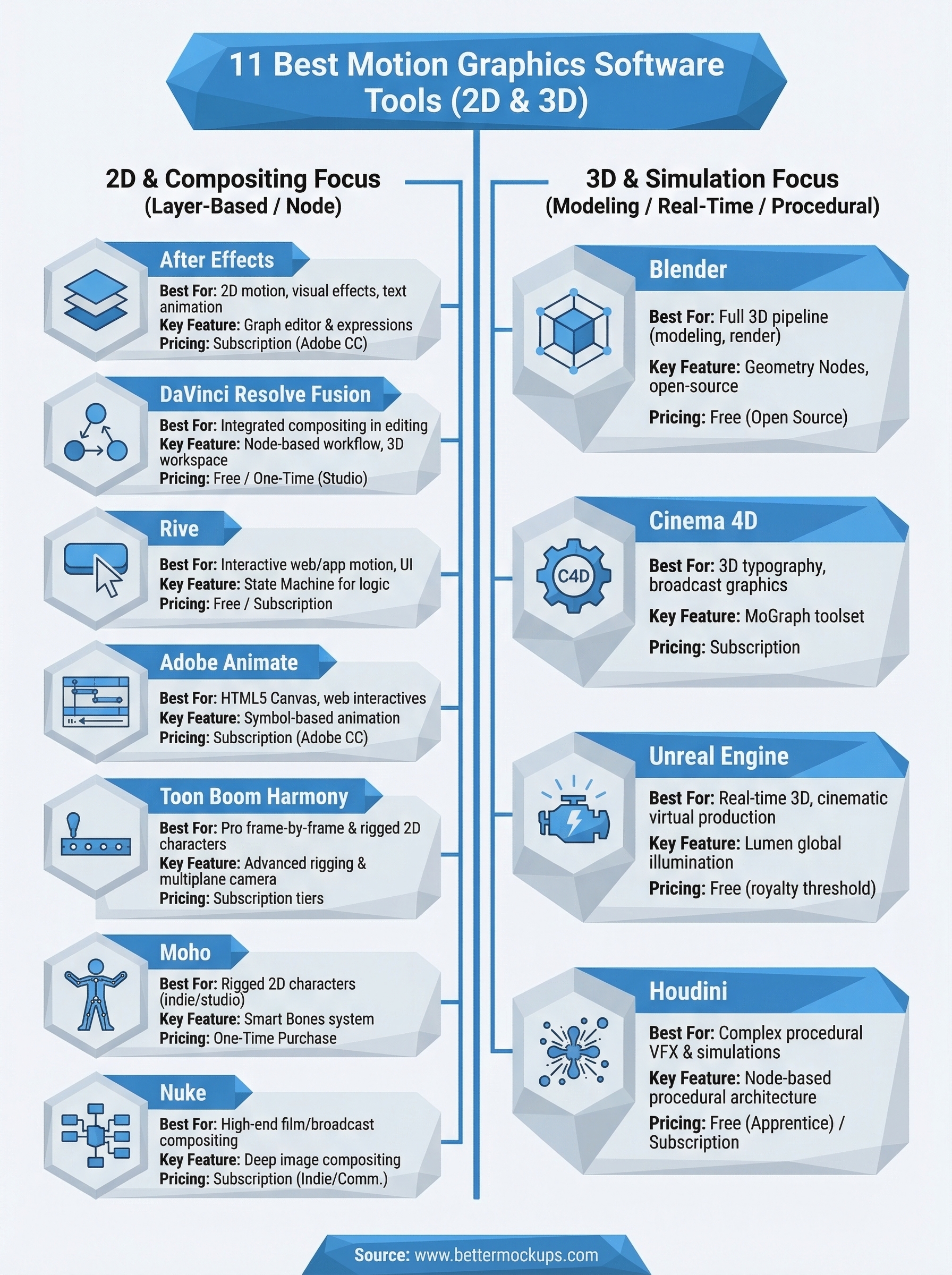
Picking the best motion graphics software comes down to matching the tool to the work you actually do. After Effects covers the widest range of 2D motion work. Blender and Cinema 4D handle genuine 3D pipelines. DaVinci Resolve Fusion fits editors who want compositing built into their video workflow. Houdini and Nuke belong to studios with specialized production demands. The rest serve specific niches worth knowing before you commit to a subscription.
Once you have your motion workflow dialed in, the assets inside your videos matter just as much as the tools you use to animate them. Inaccurate mockups inside product showcases create the same expectation gap as any other misleading visual, and that gap shows up in your reviews. If you sell phone cases through print-on-demand, production-accurate video mockup templates give your motion content something solid to work with, assets that represent the product your customer actually receives.


